macOS 13+ · Apple Silicon & Intel

Your voice, visualized.
Live.

Voice Visualizer turns your microphone into a real-time animated overlay — no templates to buy, no software subscriptions, no rendering. Just a menu bar icon and a browser source.

macOS 13 or later · Apple Silicon and Intel · Runs locally — nothing leaves your Mac

See it move
25
Visualizer Styles
9
Circular Variants
4K
Render Sharpness
0
Subscriptions
Built for Mac · Feels like it belongs here

Static overlays don't listen. Template packs don't either.

  • A static PNG "audio visualizer" overlay that never actually moves with your voice
  • A paid template pack from a marketplace, locked to one look, one color, and one aspect ratio
  • Neither one is actually listening to you

"What does my voice actually look like, right now, while I'm talking?"

Voice Visualizer answers the question those options can't. It taps your real microphone input and analyzes the actual pitch and tone of your voice in real time — not a looping video file pretending to react.

One tool. Not a drawer full of static overlays.

Voice Visualizer is calibrated for the frequency range your voice sits in — so it moves when you talk, and holds still when you don't.

Five controls. Total look.

Everything you need to dial in a look is a few clicks in one menu — nothing hidden behind a mixer.

🎛️
Style
Twenty-five distinct visualizer styles in one app. Ten across the frame: classic bars, an LED equalizer, dot matrix, mirrored wave, mountain, spikes, neon capsules, silk waves, a stereo LED dB meter and an analog VU meter. Nine circular designs: radial bars, dashed ring, waveform ring, rainbow wave ring, pulse rings, flow ribbons, spike burst, ring equalizer and dot rays. Plus six camera frames that wrap the shot itself. Switch anytime from the menu bar, no restart, no re-adding your browser source.
🖼️
Camera Frames
Six styles that react around your camera instead of under it: Pulse, Colour Chase and Equalizer, each in a square version for a normal camera and a round version for a circular camera bubble. The centre stays fully transparent, so the frame sits over your existing shot at any aspect ratio, and the thickness runs off the same height slider as everything else.
📈
Reactivity
Four named sensitivity levels — Low, Medium, High, and Max, with Max keeping headroom for quieter microphones — and a frequency range preset tuned for Voice, Wide, or Full Spectrum, sliced logarithmically like a real spectrum analyzer. Quiet mics and loud mics both land in the same visual range without you touching an audio mixer.
🤫
Noise Gate
Off, Gentle, Medium, or Strong. It measures your room's own noise floor — per frequency band — and subtracts it, so the visualizer moves when you talk and sits genuinely still when you don't. Because the thresholds are relative to your measured floor, the same setting works in a quiet booth or a noisy office.
Shape
One Visualisation height slider sizes every style. Drag it and the bars and waves run from a quarter-height strip along the bottom of the frame to full height, so the visualizer sits under your content instead of towering over it. The same slider scales the circular styles up or down, and sets how thick the camera frames sit around your shot. It updates live as you drag, on every person at once or one at a time.

Menu bar to browser source in under a minute.

No render queue, no export, no waiting. Voice Visualizer runs a live local widget URL you drop straight into your streaming app.

01
Open Voice Visualizer from your menu bar
Click Start Capture
02
Pick your microphone, pick a style
Any of the 25 styles, dialled in live — with sensitivity, bar height and the noise gate to match your room and your scene
03
Click Copy Widget URL
One local URL, no account needed
04
Paste it into a web/browser source
Works with OBS, Ecamm Live, Meld, StreamYard, vMix, and any other app that supports a browser or web overlay source. Transparent background, sized however you like.

Driven by your actual mic input
not a looping video file pretending to react

One window runs the whole show.

This is Show Control, where you set up every visualizer on your stream. Up to four people, each with their own look, their own colours and their own browser source URL to drop under their camera.
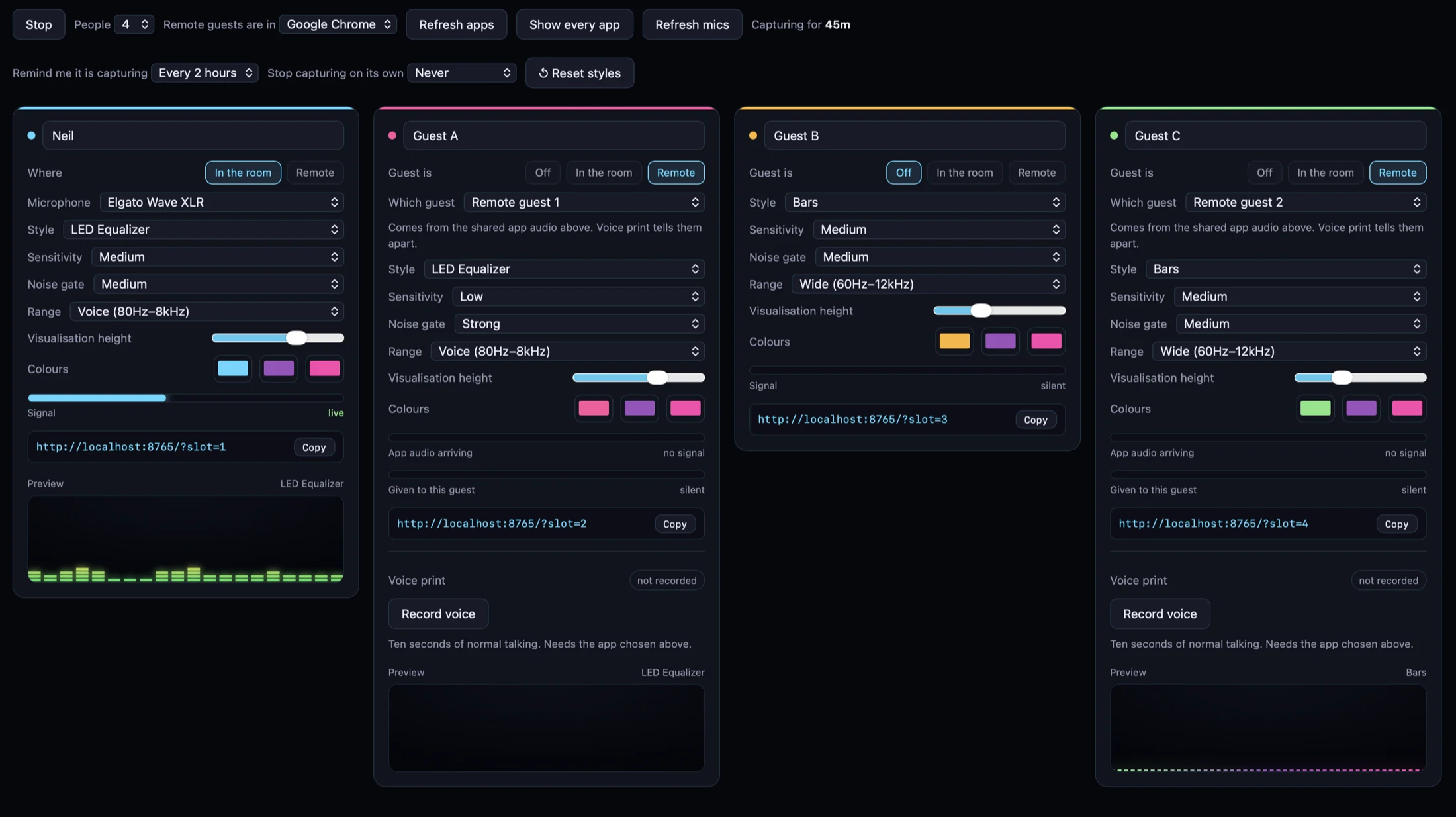
Voice Visualizer Show Control window, showing four people side by side, each with their own style, sensitivity, noise gate, frequency range, visualisation height, colours and browser source URL, with a live preview of their visualizer.

Show Control · four people, four looks, four browser sources

A visualizer per person
Every person gets their own URL, so their visualizer sits under their own camera instead of one shared bar across the whole scene.
In the room or remote
Someone in the room picks their own microphone. A remote guest is picked out of your conferencing app's audio by the sound of their voice.
See it before you go live
Each card carries a live preview of that person's visualizer, so you know what your stream will show before anyone is watching.
Read the guide before you buy

The full ten-page guide is free and needs no email address. Every control explained, all 25 styles, how to run a show with up to four people, and what to check when something looks wrong. Have a look and see whether it fits how you work.

Side by side.

Static PNG overlay
Never reacts to your actual voice. Locked to one static image — you'll want a new one eventually.
Paid template pack
Reacts to generic audio input, not tuned for speech. Usually locked to one platform or software. Often a subscription.
OBS's built-in audio meter
Reacts live, but limited styles — and not shareable to other tools.
Voice Visualizer
Reacts live to your real mic. Twenty-five styles in one app, sharp at 4K, with a noise gate that holds still on room noise. Works with OBS, Ecamm Live, Meld, StreamYard, vMix, or any tool that accepts a browser/web source. Runs locally, no subscription.

Built for anyone talking on camera.

This is for you if
  • You stream, record podcasts, or make videos
  • You want a genuinely reactive, good-looking audio visual
  • You don't want to hire a motion designer or subscribe to another SaaS tool
✗ You don't need this if
  • You need multi-track VU metering for a professional mixing desk — that's a different category of tool entirely
macOS 13+ · Apple Silicon & Intel
Get the App

Your voice, visualized. Live.

One-time purchase. No subscription. Runs entirely on your Mac.

Voice Visualizer app icon
$29
One-time · Lifetime licence · Free updates
Buy Voice Visualizer · $29

Licence key emailed straight after checkout · activate on up to 2 Macs · automatic updates built in

macOS 13+
Apple Silicon & Intel
One-time · No subscription
Automatic updates

Built by Neil Farrimond · v1.9.0 · August 2026